
Maximizing Battery Life for Your ResMed AirSense 10/11
Please ensure your heated tubing and climate control are also turned off. Please see settings below to Maximizing Battery Life for Your ResMed AirSense 10/11:
For optimal battery performance, we recommend turning off the humidifier and heated tubing. The battery will only last 2-5 hours if these settings are not disabled. Below are simple instructions to disable the humidifier and heated tubing on your ResMed AirSense 10/11:
- Connect your heated tubing and water reservoir/humidifier to your CPAP device.
- Turn on your AirSense 10/11. You should see two options: My Options and Sleep Report.
- Use the dial or touch the screen to select My Options.
- Before making changes, we recommend writing down the current settings for these three options, in case you want to restore them later:
- Climate Control
- Humidity Level
- Tube Temperature (Note: If Climate Control is set to "Auto", you won’t see the Humidity Level option.)
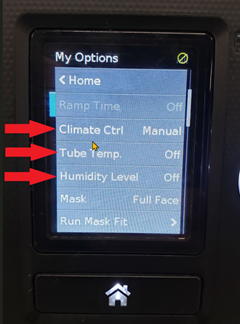
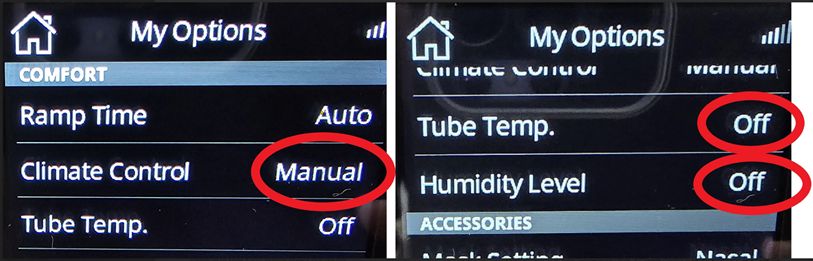
- In My Options, scroll down to Climate Control, then press the dial or tap the screen to select it. Set this option to Manual in order to disable both the humidifier and heated tubing.
- Next, go to Humidity Level. If it's set to a number between 1-8, turn the dial all the way to the left until you see Off, then press the dial to confirm. For the Airsense 11, press Off and then press OK by tapping the screen.
- Finally, scroll down to Tube Temperature. Turn the dial all the way to the left until you see Off, then press the dial to confirm. For the Airsense 11, press Off and then press OK by tapping the screen. ( You will not see tube temperature if you're not using a heated tube)
Your settings should look like this for the Resmed Airsense 10:
Your settings should look like this for the Resmed Airsense 11:
Please let us know if you have any questions or concerns.